






CityBot MT5 – All-in-One Multi-Strategy Expert Advisor for MetaTrader 5
CityBot MT5 is an all-in-one MetaTrader 5 Expert Advisor designed to bring multiple trading strategies, position-management functions, market-analysis tools, and trading utilities into a single platform. Rather than depending on one trading method, this multi-strategy EA combines Hedging, Scalping, Smart DCA, Breakout, and Trend Following approaches with a comprehensive set of tools for managing entries, exits, orders, signals, and market information.
With four dedicated trading engines and a wide range of integrated utilities, CityBot MT5 provides a flexible environment for traders who want to explore different trading approaches while keeping strategy and trade-management functions within one MT5 solution.
CityBot MT5 Overview
- Platform: MetaTrader 5
- Product Type: Multi-Strategy Expert Advisor
- Trading Strategies: 4 integrated trading engines
- Main Approaches: Hedging, Scalping, DCA, Breakout, Trend Following
- Management Tools: Order management, trimming, exit management and order spreading
- Analysis Tools: Multi-timeframe analysis, statistics, signals, sessions and news
- Trading Style: Configurable according to the selected strategy
Four Trading Strategies in One MT5 EA
The core of CityBot MT5 is its four independent strategy engines. Each one focuses on a different type of market behavior, giving traders more flexibility than a single-strategy trading robot.
1. Hedging-Pro – Two-Way Market Balancing
Hedging-Pro is designed around two-way position management and is particularly focused on relatively narrow or sideways market conditions. The strategy can be used around periods of price compression where the market is moving within a limited range.
Instead of maintaining a fixed hedging structure, the system calculates Buy and Sell exposure and adjusts the required volume as price changes.
Hedging-Pro Trading Logic
Initial Position:
When there are no active positions, the system can automatically initiate a Buy or Sell order.
Dynamic Hedging Zone:
The EA calculates a hedging area using price extremes and the configured distance parameters.
Volume Balancing:
Hedging volume is calculated according to the difference between Buy and Sell exposure. Traders can work with either Lot Multiplier or Lot BE calculations.
Moving Hedging Zone:
The hedging zone can adjust as market price develops, allowing subsequent entries to follow the changing market structure.
Hedging-Pro Highlights
- Automated initial entry and hedging
- Buy/Sell volume balancing
- Smart total-profit management
- Lot Multiplier and Lot BE options
- Dynamic hedging-zone adjustment
- Pair trimming for extended hedging sequences
- Designed for range-bound and sideways market environments
2. B9-Scalper – Fast Entry Management for Short-Term Trading
B9-Scalper is a high-speed scalping module designed for traders who actively monitor price movements and want flexible control over short-term entries.
The strategy offers two primary entry methods: Price Point and Price Zone.
Price Point Mode
In Price Point mode, traders can define specific entry levels. The system can use predefined DCA levels and automatically calculate Lot BE based on the current position structure.
Price Zone Mode
Price Zone mode allows traders to draw Buy and Sell areas directly on the chart. The EA can then use these areas as conditions for potential entries.
B9-Scalper Features
- Price Point and Price Zone entry methods
- Automatic Lot BE calculations
- Adjustable DCA spacing in pips
- Automatic removal of expired price zones
- Head-Tail order trimming
- Maximum lot controls per order and direction
B9-Scalper is particularly useful for traders who prefer an interactive, chart-focused approach to short-term scalping.
3. Season-X – Trend-Following and Breakout Trading
Season-X combines DCA accumulation, trend filtering, breakout logic, and order-management techniques into a strategy focused on directional market movement.
The system uses EMA Trend signals as part of its entry filtering process. This helps define the prevailing market direction before additional positions are considered.
Season-X Trading Features
- Lot Multiplier and Lot BE calculation modes
- EMA-based trend filtering
- Trend-direction position accumulation
- Breakout-oriented entry logic
- Pocket-profit trimming
- Re-entry functionality in sideways conditions
- Head-Tail trimming by direction
- Automatic pausing when configured loss or maximum-lot limits are reached
By combining trend identification with DCA and position trimming, Season-X provides a structured framework for exploring automated trend and breakout strategies.
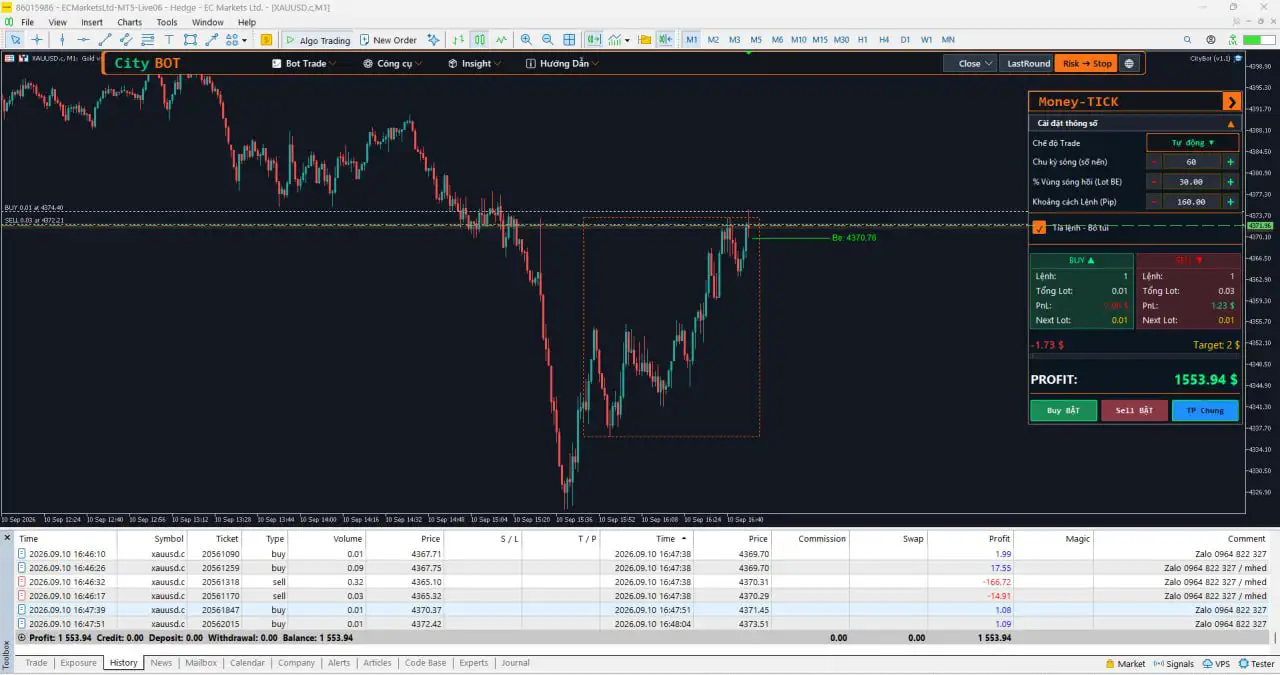
4. Money-TICK – Wave-Based Scalping Strategy
Money-TICK uses recent High/Low price waves to identify potential trading areas. The strategy examines a configurable number of candles and evaluates wave amplitude and expected retracement levels.
It provides three operating modes:
- Reversal
- Breakout
- Auto
The expected retracement level can be used to determine potential entry zones and contribute to Lot BE calculations.
Money-TICK Features
- High/Low wave scanning across configurable candle periods
- Reversal, Breakout and Auto modes
- On-chart wave-zone visualization
- Retracement-based entry calculations
- Pocket-profit trimming
- Head-Tail trimming before potential sideways periods
Money-TICK adds a wave-analysis approach to the CityBot MT5 strategy suite, making the overall EA suitable for traders interested in short-term price structure and wave-based setups.
Integrated Trading Management Tools
The functionality of CityBot MT5 extends beyond its four strategy engines. A collection of additional tools is included to help traders manage open positions, pending orders, exits, and trading information.
Pyramid Plus – Trend Position Management
Pyramid Plus is designed for traders who want to build positions as a trend develops and manage multiple orders around predefined price targets.
Main Functions
- Automatic volume increases as a trend progresses
- Closing orders around selected price targets
- Capital-management functionality
- Integration with Exit Assistant
This tool provides a structured way to manage multi-order trend positions.
Order Trimming Assistant – Flexible Position Reduction
The Order Trimming Assistant offers several ways to manage an open portfolio by selectively reducing losing, low-profit, or opposing positions.
It provides five trimming approaches:
- Same-Direction Trimming – Matches Buy or Sell positions for Head-Tail reduction.
- Cross Trimming: Buy Trims Sell – Uses Buy-side profit to help offset Sell-side losses.
- Cross Trimming: Sell Trims Buy – Uses Sell-side profit to help offset Buy-side losses.
- Full Profit Trimming – Buy – Uses available profit toward Buy-side losing positions.
- Full Profit Trimming – Sell – Uses available profit toward Sell-side losing positions.
The number of orders, trimming lot size, and minimum profit requirements can be adjusted according to the trader’s management preferences.
Exit Assistant – Complete Trade Exit Management
The Exit Assistant provides dedicated tools for managing the exit side of trading positions.
It supports three primary functions:
Stop Loss and Take Profit
Traders can define SL/TP using pips, a specific dollar amount, or a percentage of account balance.
Trailing Stop
The Trailing Stop module can automatically adjust Stop Loss after a selected profit threshold is reached. Timer-based adjustment is also available.
Break-Even
The Break-Even function can move Stop Loss to the entry level once the configured profit condition has been achieved.
The Exit Assistant supports both Single Order and Total Order modes, providing flexibility when managing individual positions or groups of trades.
Order Spreading Assistant
The Order Spreading Assistant is designed to distribute pending Buy Limit and Sell Limit orders throughout a predefined price area.
Main Functions
- Create price zones directly on the chart
- Spread Buy Limit and Sell Limit orders across a selected zone
- Calculate order volume using a dollar budget or percentage of balance
- Display pending-order details
- Calculate Stop Loss based on the selected zone
This provides a convenient way to organize pending entries while maintaining control over order distribution and position sizing.
Market Analysis and Trading Intelligence
In addition to automated strategy and order-management functions, CityBot MT5 includes several tools designed to help traders monitor market conditions.
Market Analysis
The Market Analysis module provides a broader view of market direction through multiple timeframes and technical indicators.
Features
- Multi-timeframe trend analysis
- Custom indicator support
- Trading signal alerts
This can help traders evaluate market direction across different chart periods.
Trade Statistics – Performance Monitoring
The Trade Statistics module provides detailed information about trading activity and account performance.
It includes:
- Daily profit statistics
- Calendar heatmap
- Weekly and monthly profit summaries
- Zoomable performance dashboard
- Key trading metrics
These tools can be useful when reviewing historical trading activity and evaluating how a strategy behaves over different periods.
Signal – Technical Market Alerts
The Signal module combines information from multiple technical indicators to generate Buy and Sell alerts.
Key Functions
- Buy and Sell signals
- Instant notifications
- Multiple-indicator integration
This gives traders an additional source of technical market information without requiring every indicator to be monitored independently.
Session & News – Trading Sessions and Economic Events
The Session & News module provides information about trading sessions and scheduled economic events that may influence market activity.
Features
- Daily economic news calendar
- Pre-news alerts
- Trading-session analysis
These tools can help traders identify periods when market behavior or volatility may change around scheduled economic announcements.
Why Choose CityBot MT5?
The defining feature of CityBot MT5 is its combination of multiple trading strategies and management tools within one MT5 Expert Advisor.
Instead of installing separate systems for hedging, scalping, DCA, order management, market analysis, and trading alerts, traders can access these functions through one integrated ecosystem.
Key Benefits of CityBot MT5
- Four distinct trading strategies in one EA
- Two-way Hedging and exposure balancing
- Fast scalping functionality
- Smart DCA and trend-based accumulation
- Breakout and wave-analysis strategies
- Multiple order-trimming techniques
- SL, TP, Trailing Stop and Break-Even management
- Pending-order distribution tools
- Multi-timeframe market analysis
- Detailed trading statistics
- Technical Buy/Sell alerts
- Economic news and trading-session information
- Multiple configurable trading approaches
A Complete Multi-Strategy Trading Ecosystem for MT5
CityBot MT5 is designed for traders who want more than a conventional single-strategy Expert Advisor. Its four strategy engines cover different market scenarios and trading concepts, including range-based Hedging, fast Scalping, trend accumulation, Breakout trading, and wave analysis.
The integrated management tools add another layer of functionality by helping traders organize entries, manage open positions, trim orders, configure exits, distribute pending orders, and monitor trading performance.
As a result, CityBot MT5 can serve as a centralized trading toolkit for traders who want to explore multiple strategies and management techniques from within the MetaTrader 5 environment.
Getting Started with CityBot MT5
Getting started with CityBot MT5 involves installing the Expert Advisor on MetaTrader 5 and selecting the strategy or management tools that correspond to the desired trading approach.
Before using any automated trading system on a live account, traders should first test the relevant configuration in a demo environment. It is also important to evaluate broker-specific conditions such as spreads, execution speed, leverage, available trading symbols, and account risk.
Understanding how each strategy behaves in different market conditions is an essential part of responsible automated trading.
Final Thoughts
CityBot MT5 brings four different trading engines and a comprehensive set of professional management utilities together in one MetaTrader 5 Expert Advisor.
From Hedging-Pro and B9-Scalper to Season-X and Money-TICK, the platform provides multiple approaches to market participation. Its supporting tools further expand its capabilities with position trimming, trend-position management, exit controls, pending-order spreading, market analysis, performance statistics, technical signals, and news monitoring.
For traders searching for a flexible multi-strategy MT5 trading robot, CityBot MT5 offers an integrated environment for experimenting with and managing different trading approaches from a single Expert Advisor.
Risk Disclaimer
Automated trading carries substantial financial risk. No trading strategy or Expert Advisor can guarantee profits, and historical performance is not an assurance of future results. Hedging, DCA, Scalping, multi-position strategies, and other automated approaches may experience significant drawdowns during unfavorable market conditions.
Always test CityBot MT5 thoroughly in a demo account, apply appropriate risk-management practices, and carefully evaluate your broker’s trading conditions before using the system with real funds.


Reviews
There are no reviews yet.