



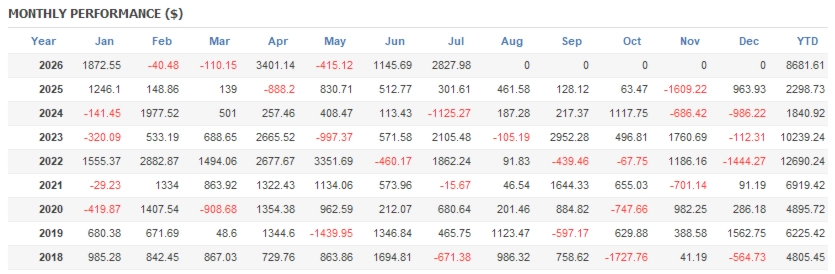
OilVector X MT5 – Automated WTI Crude Oil Breakout EA for MetaTrader 5
What Is OilVector X MT5?
OilVector X MT5 is a specialized Expert Advisor for automated WTI Crude Oil trading on MetaTrader 5. Instead of using complex recovery systems, the EA is built around a structured daily breakout methodology, designed to identify potential directional movements when crude oil moves beyond important daily price levels.
The system is designed with simplicity in mind. Its plug-and-play structure allows traders to select the appropriate WTI symbol, configure their preferred risk parameters, and begin testing without having to build a complicated trading setup.
Depending on the broker, WTI Crude Oil may appear under different symbols, including XTIUSD, USOUSD, WTI, or another broker-specific designation.
A defining characteristic of OilVector X MT5 is its individual trade protection. Each position is opened with its own Stop Loss and Take Profit, while the strategy does not depend on Grid, Martingale, or basket recovery techniques.
Risk warning: Automated trading involves substantial financial risk. Backtested, simulated, or previous live performance should not be interpreted as a guarantee of future results.
Why Use an Automated WTI Crude Oil Trading Strategy?
WTI Crude Oil is a highly active market that can respond rapidly to fundamental and macroeconomic developments. Changes in supply and demand, inventory reports, geopolitical events, economic data, and broader market sentiment can all influence crude oil prices.
These characteristics make oil an interesting but challenging market for automated systems.
Rather than attempting to recover losing trades through increasing exposure, OilVector X MT5 follows a breakout-oriented approach. The objective is to participate when the market develops a meaningful directional move and breaks through a relevant daily level.
This approach gives the EA a clearly defined market framework while keeping trade management rules structured and systematic.
How the OilVector X MT5 Trading Engine Works
The core logic behind OilVector X MT5 is based on identifying daily breakout conditions in the WTI market.
The EA continuously evaluates market conditions according to its programmed rules. When the necessary criteria are satisfied, it can execute a trade automatically and manage the position without requiring manual intervention.
Its trading framework includes:
- Daily breakout entry logic
- Individual Stop Loss protection
- Predefined Take Profit
- Automated Break-even management
- Risk-based position sizing
- Automatic order execution
- Integrated performance statistics
- Real-time Equity Curve
- Optional Prop Firm Mode
This creates a rules-based framework for automated WTI trading through MetaTrader 5.
A Non-Grid and Non-Martingale Trading Structure
For traders specifically looking for a non-Martingale oil EA, the trade management structure of OilVector X MT5 is an important distinction.
The system does not use:
- Grid recovery
- Martingale lot multiplication
- Recovery baskets
- Progressive averaging to recover losses
Instead, each trade has its own Stop Loss from the beginning of the position.
This can make the risk profile of individual positions easier to evaluate compared with recovery strategies that can progressively increase market exposure during an adverse move.
However, avoiding Grid and Martingale does not make the system risk-free. A breakout strategy can still experience false breakouts, losing trades, consecutive losses, and periods of drawdown.
Automated Break-Even Management
OilVector X MT5 includes an automated Break-even management component.
When a position develops favorably, the EA can adjust its protection according to the strategy’s predefined rules. The intention is to respond to changing momentum and manage open positions without requiring the trader to manually modify orders.
Actual trade execution can still vary because of market volatility, liquidity, Spread, Slippage, execution speed, and broker conditions.
Designed Specifically for WTI Crude Oil
Unlike a generic multi-market Expert Advisor, OilVector X MT5 is purpose-built for the WTI Crude Oil market.
Your broker may list WTI using one of several different symbols, such as:
- XTIUSD
- USOUSD
- WTI
- Other broker-specific oil symbols
Selecting the correct symbol is essential when installing and testing the EA.
The trading environment for WTI can also differ considerably between brokers. Therefore, historical results generated on one broker should not automatically be considered representative of another broker’s execution environment.
Broker Conditions Matter
WTI trading conditions can vary significantly from one broker to another. This makes broker compatibility an important consideration when evaluating OilVector X MT5.
Factors that may influence actual trading results include:
- Spread
- Swap charges
- Commission
- Margin requirements
- Contract specifications
- Trading sessions
- Tick-data quality
- Execution speed
- Slippage
- Symbol specifications
The development and testing methodology references brokers such as Darwinex and IC Markets/IC Trading as examples of environments where WTI conditions can be evaluated.
Nevertheless, traders should independently verify current broker conditions and perform their own testing before choosing a live trading environment.
Prop Firm Mode for Additional Risk Controls
One of the notable features of OilVector X MT5 is its dedicated Prop Firm Mode.
This mode is designed to provide additional controls for traders operating under evaluation or funded-account rules. Instead of relying solely on the broker’s standard account protection, traders can configure additional limits within the EA.
Maximum Daily Loss
A daily loss threshold can be configured. Once the defined limit is reached, the EA can stop opening additional trades for the remainder of the trading day.
Maximum Total Loss
Users can define a maximum overall loss level based on the starting balance recorded by the EA.
Optional Maximum Daily Profit
A daily profit ceiling can also be enabled. Once the configured level is reached, the EA can stop further trading for the day.
This feature can be used to limit additional exposure after a profitable trading session.
Entry, SL and TP Randomization
OilVector X MT5 provides configurable randomization for Entry, Stop Loss, and Take Profit levels within specified ranges.
This functionality can introduce controlled variations between accounts using the same EA configuration and may help reduce trading-pattern correlation.
Reset State
The Reset State option allows stored Prop Firm tracking information to be cleared when beginning a new evaluation or starting a new account cycle.
Integrated MT5 Trading Dashboard
Monitoring an automated trading system is easier when key information is available directly inside the trading terminal.
OilVector X MT5 includes an on-chart dashboard designed to provide relevant trading and account statistics within MetaTrader 5.
The dashboard can provide information such as:
- Trading statistics
- Account-related information
- Equity Curve
- EA performance data
The system also maintains persistent state information, allowing relevant dashboard data to remain available after the EA is removed or the MetaTrader terminal is restarted.
This reduces the need to depend exclusively on external performance-tracking services.
Simple Plug-and-Play Installation
The installation process for OilVector X MT5 is designed to be straightforward.
Basic Setup
- Install the Expert Advisor in MetaTrader 5.
- Open the WTI Crude Oil chart provided by your broker.
- Identify the correct WTI symbol, such as XTIUSD, USOUSD, or WTI.
- Attach OilVector X MT5 to the chart.
- Configure the appropriate risk and lot-sizing parameters.
- Review the EA inputs and broker-specific trading conditions.
- Run a demo test before considering live deployment.
The EA also incorporates a timer-driven fallback mechanism intended to support continued operation when live tick activity is temporarily unavailable.
Running OilVector X MT5 on a VPS
A VPS (Virtual Private Server) can provide a practical environment for traders running automated MetaTrader 5 systems.
Using a VPS may help reduce interruptions caused by:
- Computer shutdowns
- Internet outages
- Terminal closures
- Local power failures
While a VPS can improve the continuity of the local trading environment, it cannot remove broker-side execution risks, liquidity issues, Slippage, or market volatility.
Backtesting OilVector X MT5
Backtesting should be an important part of evaluating any automated trading strategy.
For OilVector X MT5, traders should pay particular attention to the quality of the historical data and the WTI symbol being tested.
1. Choose the Correct WTI Symbol
Select the WTI Crude Oil symbol used by your broker, such as XTIUSD, USOUSD, or WTI.
2. Use Real Tick Data
Where supported, the Every Tick Based on Real Ticks option in MetaTrader 5 can provide a more detailed historical simulation.
3. Use an Appropriate Account Size
The source testing methodology references a deposit of $1,000 or more, but the appropriate account size ultimately depends on the selected risk percentage, position-sizing method, broker requirements, and desired exposure.
Smaller accounts may require more conservative settings.
4. Use a Long Testing Period
A historical test beginning around 2018 can provide a broader view of how the strategy behaves across different market conditions, provided suitable historical data is available.
Testing across multiple market regimes is generally more informative than relying on a short period.
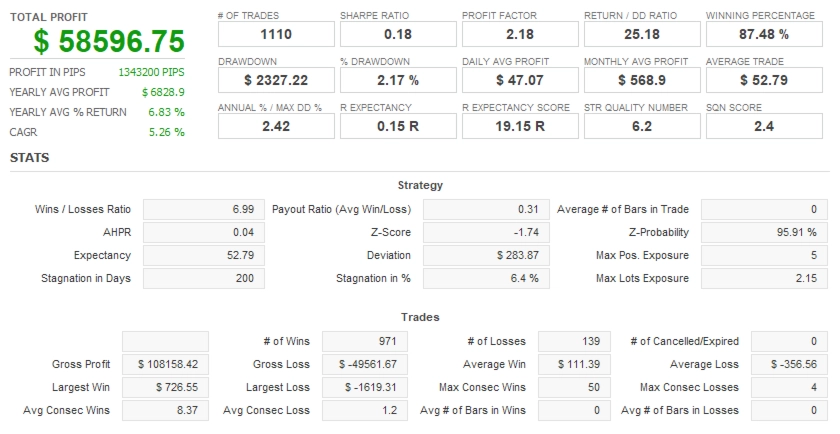
5. Analyze Risk-Adjusted Performance
Net profit alone is not sufficient to evaluate an automated trading strategy.
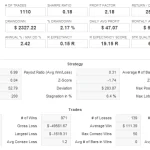
Useful metrics include:
- Recovery Factor
- Sharpe Ratio
- Maximum Drawdown
- Profit Factor
- Number of trades
- Average trade
- Consecutive losing trades
- Equity Curve behavior
- Maximum market exposure
Recovery Factor can help provide additional context by comparing overall gains with the drawdown experienced during the test.
Development and Out-of-Sample Validation
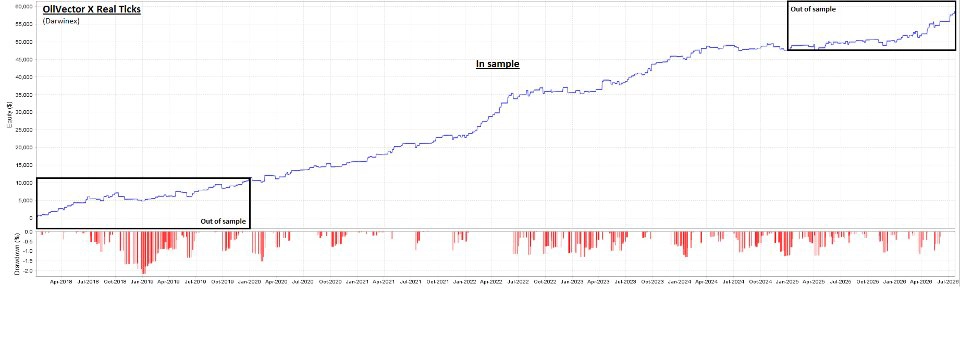
The stated development methodology for OilVector X MT5 uses Darwinex real tick data and separates development data from validation data.
The described periods are:
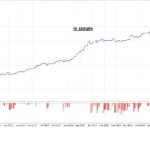
- In-Sample Development/Optimization: 2020–2024
- Out-of-Sample Validation: 2018–2020
- Out-of-Sample Validation: 2024–July 2026
Having validation periods on both sides of the optimization window provides an additional historical test of whether the trading logic can operate on data that was not directly used for optimization.
This methodology does not remove the possibility of overfitting, nor does it guarantee future performance. Instead, it provides another layer of historical evaluation when analyzing the robustness of a trading system.
Main Features of OilVector X MT5
The principal features of OilVector X MT5 include:
- Dedicated WTI Crude Oil trading logic
- MetaTrader 5 compatibility
- Daily breakout strategy
- Plug-and-play setup
- Individual Stop Loss for each position
- Fixed Take Profit
- Automated Break-even management
- No Grid recovery
- No Martingale recovery
- Prop Firm Mode
- Maximum Daily Loss control
- Maximum Total Loss control
- Optional Maximum Daily Profit
- Entry, SL and TP randomization
- Integrated on-chart dashboard
- Real-time Equity Curve
- Persistent state information
- Timer-based execution fallback
- VPS-compatible operation
Who May Consider OilVector X MT5?
OilVector X MT5 may be worth considering for traders interested in:
- Automated WTI Crude Oil trading
- Daily breakout strategies
- MetaTrader 5 Expert Advisors
- Automated commodity trading
- Rules-based trading systems
- Risk-controlled automated execution
- Prop Firm trading environments
- Non-Martingale trading approaches
- Non-Grid trading systems
- VPS-based automated trading
It can also appeal to users who want to monitor an automated WTI strategy directly from the MetaTrader 5 interface through an integrated statistics dashboard.
Nevertheless, understanding the behavior of crude oil and the risks of automated trading is essential before using the system with real capital.
Risk Management and Account Considerations
OilVector X MT5 is not a zero-drawdown trading system.
Even a rules-based breakout methodology can encounter unfavorable market conditions, including:
- Losing trades
- Consecutive losing periods
- False breakouts
- Sudden volatility
- Spread expansion
- Slippage
- Execution differences
- Drawdown
The appropriate account size should be determined according to the selected risk level, lot-sizing model, broker conditions, margin requirements, and individual risk tolerance.
Conservative settings may be particularly important when working with smaller accounts.
Before moving to live trading, users should test the EA with realistic broker data and evaluate both historical drawdown and potential adverse market scenarios.
Why Consider OilVector X MT5 for Automated WTI Trading?
For traders searching for an automated WTI Crude Oil EA for MetaTrader 5, OilVector X MT5 combines several elements into a single trading framework.
Its approach is centered on daily price breakouts rather than recovery-based exposure. Individual Stop Losses, predefined Take Profit levels, Break-even management, and risk-based position sizing provide a structured framework for trade management.
The additional Prop Firm Mode and integrated dashboard extend the system beyond basic automated entry and exit functionality.
Most importantly, the strategy can be evaluated through historical testing and demo trading before a trader decides whether its characteristics fit their own objectives and risk tolerance.
Final Overview
OilVector X MT5 is a specialized automated Expert Advisor built for WTI Crude Oil trading on MetaTrader 5.
Its core methodology focuses on daily breakout levels and directional price movement, while its trade management avoids Grid and Martingale recovery techniques. Every position is managed with predefined risk parameters, including Stop Loss and Take Profit.
Additional features such as Prop Firm Mode, Daily Loss controls, Daily Profit limits, trade randomization, Break-even management, an on-chart dashboard, Equity Curve tracking, and VPS compatibility make the system suitable for traders seeking a structured automated WTI trading environment.
However, no automated strategy can eliminate market risk. Broker conditions, execution quality, Spread, Slippage, liquidity, volatility, and risk settings can all affect real-world results.
Thorough backtesting, out-of-sample analysis, demo testing, and disciplined position sizing should therefore be part of the evaluation process before live deployment.
Risk Disclaimer
Trading WTI Crude Oil and other leveraged financial instruments carries a substantial risk of financial loss. Historical backtests, simulated results, out-of-sample testing, and previous live performance are not guarantees of future results.
OilVector X MT5 does not eliminate market risk, Drawdown, Slippage, Spread expansion, liquidity risk, or broker execution risk.
Before using the EA with real funds, traders should verify the WTI contract specifications and trading conditions offered by their broker, test the system on a demo account, select appropriate risk parameters, and ensure that the capital allocated is money they can afford to lose.


Reviews
There are no reviews yet.