





GoldenShot MT5 – Single-Position XAUUSD Gold Trading Expert Advisor
GoldenShot MT5 Overview
GoldenShot MT5 is an automated Gold trading Expert Advisor developed for XAUUSD on MetaTrader 5. The EA follows a selective, single-position approach: it waits for a qualifying market condition, opens one trade, places a broker-side Stop Loss, and manages that position according to the strategy responsible for the entry.
Rather than attempting to remain active throughout every market session, GoldenShot MT5 is designed to wait for conditions that meet its internal criteria. When Gold becomes excessively choppy, unclear, or unsuitable for its strategies, the EA can remain inactive.
The system is deliberately built without several common recovery techniques. GoldenShot MT5 does not use Grid trading, Martingale, averaging down, or progressive lot scaling.
Its core philosophy can be summarized simply:
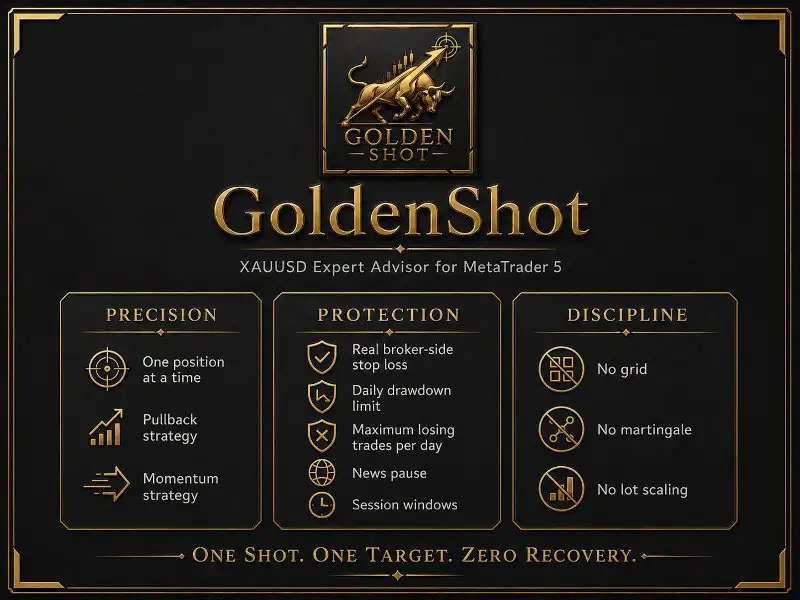
One shot. One target. Zero recovery.
What Is GoldenShot MT5?
GoldenShot MT5 is a single-position XAUUSD trading EA for MetaTrader 5 that combines two separate trading approaches: Pullback and Momentum.
Instead of continuously placing pending orders or building a basket of positions, the EA analyzes its market conditions and waits until a strategy-specific setup qualifies.
Its analysis can consider factors such as:
- Market momentum
- Price volatility
- Candle structure
- Market structure
- Trend strength
- Structural changes
- Pullback behavior
- Directional continuation
- Market conditions surrounding an entry
When a setup does not satisfy the required conditions, GoldenShot MT5 can simply stay out of the market.
This selective behavior is an important part of its design. The EA is not intended to generate a trade every day or react to every large candle on the XAUUSD chart.
Single-Position XAUUSD Trading
The defining feature of GoldenShot MT5 is its single-position architecture.
Only one GoldenShot MT5 trade can be active at a time.
Once a strategy opens a position, that position remains under the strategy’s management until it is closed. Afterward, the EA follows its configured cooldown before searching for another opportunity.
GoldenShot MT5 does not use additional positions to rescue an unsuccessful trade.
The EA does not:
- Stack multiple positions
- Average down losing trades
- Increase lot size after a loss
- Build Grid recovery baskets
- Open an opposite position as a recovery mechanism
- Add positions simply because the existing trade is losing
Each position therefore represents an individual trading setup rather than one component of a larger recovery structure.
Two Strategies for Automated Gold Trading
GoldenShot MT5 includes two independent trading strategies, each with its own entry logic and position-management behavior.
Pullback Gold Strategy
The Pullback strategy searches for retracements toward relevant short-term price areas before looking for confirmation of a potential reversal or continuation.
The strategy can evaluate:
- Trend strength
- Market momentum
- Candle structure
- Pullback characteristics
- Rebound confirmation
Rather than buying or selling simply because price reaches a particular level, the strategy looks for additional conditions before opening a trade.
The Pullback system also includes additional rapid-failure protection for selected post-entry situations.
Momentum Gold Strategy
The Momentum strategy focuses on fresh directional movements supported by sufficient trend strength and expanding volatility.
The strategy is not designed to automatically enter every large Gold candle. Instead, it looks for evidence that the directional movement still has sufficient structural support.
Momentum positions can use a different trailing and protection profile from Pullback trades.
Both strategies can operate on:
- BUY positions
- SELL positions
Users can also disable one strategy independently or restrict trading to a particular direction.
Trade identification can indicate which strategy generated the position, making it easier to distinguish Pullback and Momentum activity.
Why GoldenShot MT5 Can Remain Out of the Market
A common expectation with automated trading software is that the EA should constantly search for new positions.
GoldenShot MT5 takes a different approach.
If the required conditions are not present, the system can wait.
This means periods without trades are part of the product’s intended operating model rather than necessarily indicating a malfunction.
The EA is designed to avoid forcing entries during conditions that do not satisfy its internal rules.
For traders who expect continuous activity, this behavior is an important consideration before using the system.
Broker-Side Stop Loss Protection
Every GoldenShot MT5 position is protected by a broker-side Stop Loss.
The Stop Loss is not merely an internal software instruction. Protective modifications are sent to the broker and handled through the EA’s stop-management system.
The existing protection remains in place until a new, tighter protective level has been confirmed.
GoldenShot MT5 separates trade protection into several areas:
- Initial Stop Loss
- Dynamic position management
- Trailing protection
- Early invalidation management
A broker-side Stop Loss provides an important risk-control mechanism, but it cannot guarantee an exact execution price under all market conditions.
Extreme volatility, market gaps, spread expansion, and reduced liquidity can cause the actual execution price to differ from the requested Stop Loss level.
Invalidation-Based Trade Management
GoldenShot MT5 is designed around the idea that a trading setup can fail before the market reaches the original Stop Loss.
For this reason, the EA incorporates validation before entry and additional management after entry.
Pre-Entry Validation
Before opening a position, the system can examine conditions associated with potentially weak setups.
Examples include:
- A rebound occurring inside a weakening market move
- A market that has stalled after an extended movement
- A continuation setup that has already lost momentum
- Structural changes that weaken the original trade idea
When the required conditions are not satisfied, the EA can reject the setup rather than opening a position.
Post-Entry Failure Management
The Pullback strategy contains additional protection for certain rapid-failure situations.
If several closed-candle conditions indicate that the original market movement is failing, GoldenShot MT5 can request a tighter broker-side Stop Loss.
The Momentum strategy follows a different management model because the product’s testing indicated that its losing and recovering positions could not reliably be separated using the same rapid-failure rule.
This allows each strategy to retain its own evidence-based management structure rather than applying identical rules to different market behaviors.
Trailing Stop Management
GoldenShot MT5 also includes a Trailing Stop system designed to adjust protective levels as a position moves in the expected direction.
Depending on the strategy and configuration, trailing management can:
- Follow favorable price movement
- Progressively adjust protection
- Lock in part of an open profit
- Send broker-side Stop Loss modifications
- Confirm protective changes through the EA’s management logic
Trailing behavior is strategy-dependent.
Actual execution can still be influenced by spread, volatility, liquidity, broker infrastructure, and slippage.
XAUUSD News Filter and Economic Event Protection
Gold can react sharply to major economic announcements, particularly events involving the US dollar.
GoldenShot MT5 includes news protection designed to reduce automated trading activity around high-impact events such as:
- CPI
- FOMC
- NFP
- Other high-impact USD economic releases
The system can also account for selected USD bank holidays.
Two economic-data sources are integrated into the product:
- Forex Factory
- MQL5 Economic Calendar
If one source becomes unavailable, the EA can use the other source as a fallback where supported.
Why News Protection Matters for Gold Trading
Major economic announcements can create conditions that are difficult to reproduce accurately in a conventional backtest.
During major releases, XAUUSD can experience:
- Rapid price movement
- Wider spreads
- Slippage
- Temporary liquidity changes
- Significant price jumps
- Different execution conditions
A historical Strategy Tester cannot perfectly reproduce every live-market condition surrounding a major economic release.
GoldenShot MT5 therefore incorporates news filtering into its trading logic to make the system more selective around significant events.
Gold Broker Compatibility and Price Precision
XAUUSD specifications can vary significantly between brokers.
For example, one broker may quote Gold with two decimal places while another may use three decimal places.
GoldenShot MT5 includes automatic broker-geometry handling intended to accommodate supported Gold pricing configurations.
This can be particularly useful for three-digit Gold environments, including XAUUSD configurations similar to those used by some Exness accounts.
Before running any Gold EA, traders should verify their broker’s:
- XAUUSD symbol name
- Number of price digits
- Point size
- Tick size
- Contract size
- Minimum lot
- Tick value
- Margin requirements
- Trading sessions
These specifications can affect both position sizing and trading risk.
Fixed Lot and Percentage Risk Sizing
GoldenShot MT5 supports different position-sizing methods.
Traders can use a fixed lot size or calculate position size according to a percentage of account risk.
When percentage-based risk is selected, the system uses the actual Stop Loss distance of the trade when determining position size.
This is different from using a generic fixed Stop Loss assumption for every trade.
Available approaches include:
- Fixed lot sizing
- Percentage-based account risk
- Broker minimum-lot handling
On smaller accounts, the broker’s minimum permitted lot can affect the actual risk percentage achieved by a trade.
Trading Windows and Session Controls
GoldenShot MT5 does not need to operate during every minute of the trading week.
Its scheduling functionality can include:
- Multiple Monday-to-Thursday trading periods
- A dedicated Friday schedule
- Christmas holiday protection
- Automatic daylight-saving adjustments
- News-related trading pauses
- Post-trade cooldown periods
These controls allow the EA to restrict new entries according to the configured schedule.
GoldenShot MT5 Dashboard
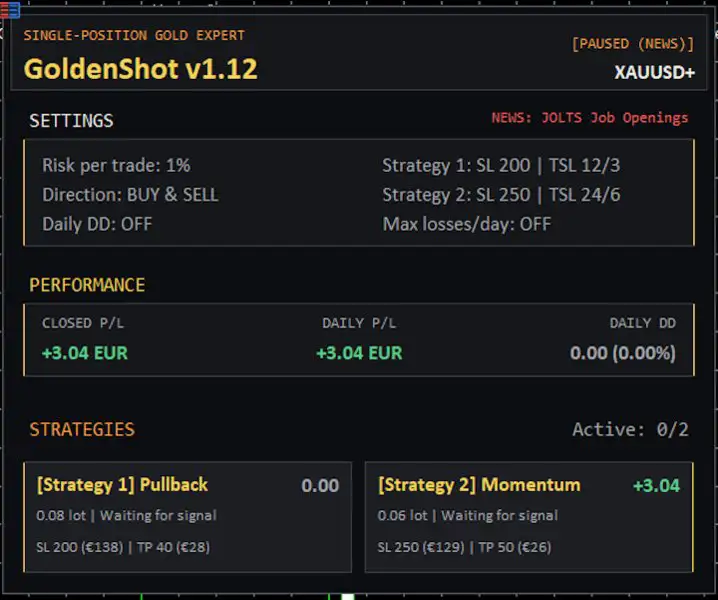
An optional black-and-gold dashboard provides information about the EA’s current status and trading environment.
Depending on the configuration, traders can view information such as:
- EA operating status
- Position sizing
- Protection parameters
- Daily results
- Closed trade results
- Strategy-specific performance
- Drawdown
- News status
- Current open position
- Active Stop Loss
- Profit target
- Trading restrictions
The dashboard can also help explain periods of inactivity by showing whether trading is being restricted by the schedule, news filter, cooldown, risk controls, or other conditions.
Recommended GoldenShot MT5 Configuration
The following settings are provided as configuration guidance rather than performance guarantees.
- Symbol: XAUUSD / Gold
- Platform: MetaTrader 5
- Timeframe: Any supported chart timeframe
- Trading Style: Single-position Gold trading
- Strategies: Pullback + Momentum
- Minimum Deposit: $250 with 0.01 fixed lot
- Recommended Deposit: $500+
- Suggested Capital for ~1% Risk: Approximately $2,000–$2,500, depending on actual stop and broker specifications
- Account Type: Hedging
- Broker Type: RAW / ECN preferred
- Leverage: 1:100 or higher, subject to broker rules
- VPS: Recommended for continuous operation
- Risk Model: No Grid / No Martingale
Account size alone does not determine actual trading risk. Stop Loss distance, contract specifications, minimum lot size, leverage, and broker conditions must also be considered.
Broker Environments Tested
According to the product specifications, GoldenShot MT5 has been tested with several broker environments, including:
- Vantage
- VT Markets
- IC Markets
- BlackBull
- FXTRADING
- Exness with three-digit Gold pricing
Compatibility with another RAW or ECN broker does not mean identical trading results.
Differences in:
- Spread
- Commission
- Slippage
- Execution speed
- Liquidity
- Contract specifications
- Server infrastructure
can affect how an automated Gold EA operates.
For this reason, testing GoldenShot MT5 on the specific broker and account type intended for live trading is recommended.
VPS for Automated Gold Trading
A Windows VPS can help keep MetaTrader 5 connected during the trading week.
This can be useful because GoldenShot MT5 relies on continuous access to:
- MT5
- Broker servers
- Order-management functions
- News-filter services
- Stop-management operations
The product configuration recommends targeting approximately 20 ms or lower latency to the broker server when practical.
Low latency can help with communication efficiency, but it does not eliminate slippage or guarantee a specific execution price.
Backtesting GoldenShot MT5
GoldenShot MT5 places particular emphasis on more recent Gold market conditions.
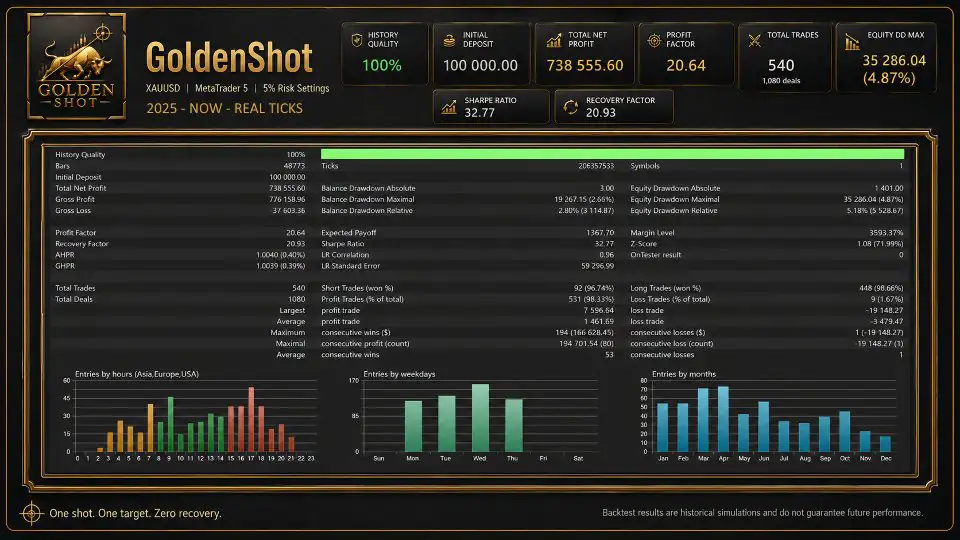
The recommended evaluation period is 2025 to the current date, preferably using real-tick data when available.
The product specifications advise against placing heavy reliance on historical data from 2024 and earlier.
When evaluating the EA, traders can examine:
- Maximum drawdown
- Losing streaks
- Total number of trades
- Average trade characteristics
- Stop Loss frequency
- Performance under different spreads
- Broker-specific results
- News-filter behavior
- Forward-demo results
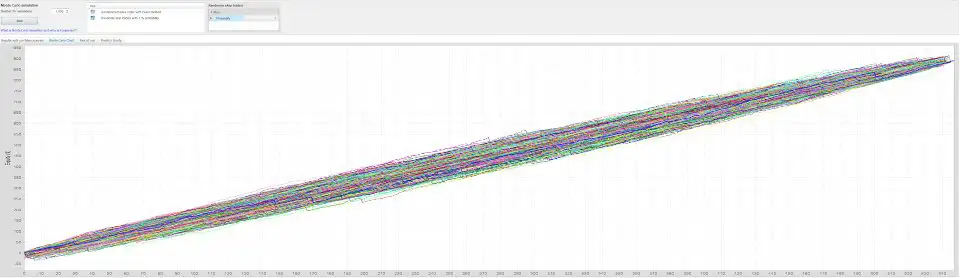
Backtesting should be treated as a historical simulation rather than a forecast of future performance.
What GoldenShot MT5 Does Not Use
GoldenShot MT5 has been designed specifically without several recovery techniques used by some automated trading systems.
The EA does not use:
- Grid trading
- Martingale
- Averaging down
- Progressive lot scaling
- Hidden recovery positions
- Multiple simultaneous positions
- Trades without a broker-side Stop Loss
This does not remove market risk, but it provides a clearly defined framework for how the EA handles an unsuccessful trading setup.
GoldenShot MT5 Features
The main product features include:
- Automated XAUUSD trading for MetaTrader 5
- Two integrated Gold strategies
- Pullback strategy
- Momentum strategy
- Single-position execution
- BUY and SELL trading
- Broker-side Stop Loss
- Pre-entry setup validation
- Rapid-failure protection for supported Pullback conditions
- Trailing Stop management
- High-impact news filtering
- USD bank-holiday filtering
- Two news-data sources
- Support for three-digit Gold pricing
- Fixed-lot position sizing
- Percentage-based risk sizing
- Stop Loss-based position calculation
- Multiple daily trading windows
- Dedicated Friday schedule
- Cooldown management
- Automatic daylight-saving adjustment
- Strategy identification in trade comments
- Optional trading dashboard
- Drawdown monitoring
- Broker-feed testing
- Version-based updates
- Developer support
How to Install GoldenShot MT5
GoldenShot MT5 is supplied with default settings intended to simplify the initial setup.
Step 1 – Enable Automated Trading
Open MetaTrader 5 and enable algorithmic trading in the Expert Advisor settings.
If the news-filter configuration requires WebRequest access, add the address specified in the current product documentation and restart MT5 when required.
Step 2 – Open the Gold Chart
Open the Gold symbol provided by your broker, such as XAUUSD.
Attach GoldenShot MT5 to the chart.
The EA uses its own internal strategy logic, so the chart timeframe does not necessarily represent the analytical timeframe used internally.
Step 3 – Choose Position Sizing
Select either:
- Fixed lot
- Percentage risk per trade
Review the calculated exposure and compare it with your account balance and broker’s minimum lot requirements.
Step 4 – Review the Dashboard
Check the dashboard to confirm that GoldenShot MT5 is monitoring the market.
If trading is paused, the status information can help identify possible reasons such as:
- Trading schedule
- News protection
- Cooldown
- Daily risk limits
- Market conditions
Step 5 – Keep MetaTrader 5 Connected
For continuous automated operation, MetaTrader 5 should remain open and connected to the broker.
A VPS can be used to support continuous operation throughout the trading week.
GoldenShot MT5 for Prop-Firm Accounts
GoldenShot MT5 can be configured with daily drawdown protection for traders using accounts with specific risk limits.
Users should set the EA’s drawdown protection below the maximum loss permitted by their particular prop-firm program rather than relying solely on the software.
Where supported, additional controls such as a maximum number of losing trades per day can also be considered.
Prop-firm conditions vary between providers and can change, so users should always verify the current rules of their specific account.
Who Is GoldenShot MT5 For?
GoldenShot MT5 may be relevant to traders searching for an automated Gold EA with:
- Single-position XAUUSD trading
- Pullback and Momentum strategies
- Broker-side Stop Loss protection
- No Grid
- No Martingale
- No averaging down
- Automated economic-news filtering
- Strategy-specific trade management
- Percentage-based risk sizing
- RAW/ECN broker compatibility
- VPS-based automated operation
The product’s selective design is particularly important to understand before deployment.
GoldenShot MT5 is not designed with the objective of entering every large Gold candle or generating trades every day regardless of market conditions.
Its operating model is based on waiting for qualifying setups.
Why Consider a Single-Position Gold EA?
A single-position architecture can provide a straightforward framework for monitoring automated XAUUSD exposure.
Instead of managing a collection of recovery trades, the system maintains one active trading idea at a time.
With GoldenShot MT5, the combination of:
- One active position
- Real broker-side Stop Loss
- Strategy-specific management
- Pullback and Momentum logic
- News filtering
- Trailing protection
- No Grid
- No Martingale
creates a clearly defined automated trading structure.
However, structural simplicity should not be confused with low risk. Gold remains a volatile instrument, and automated trading results can vary substantially between market conditions and broker environments.
Final Overview of GoldenShot MT5
GoldenShot MT5 is an automated XAUUSD Expert Advisor for MetaTrader 5 built around a single-position trading model and two distinct strategies: Pullback and Momentum.
The system emphasizes selective entries, broker-side Stop Loss protection, strategy-specific trade management, news filtering, trading schedules, trailing protection, and risk-based position sizing.
Its design deliberately excludes Grid, Martingale, averaging down, and hidden recovery positions.
Rather than attempting to trade continuously, GoldenShot MT5 can remain inactive when its entry conditions are not satisfied.
For traders evaluating an automated Gold trading EA, the most important factors remain the system’s actual configuration, broker conditions, execution environment, historical testing methodology, forward-demo behavior, account size, and risk parameters.
GoldenShot MT5 should therefore be evaluated under realistic broker-specific conditions before any live deployment.
Risk Disclaimer
Trading Gold, Forex, and CFDs involves substantial financial risk and can result in partial or total loss of capital.
XAUUSD can experience rapid price movements, spread expansion, slippage, gaps, and changes in market liquidity. A broker-side Stop Loss is an important risk-management mechanism but does not guarantee execution at the exact requested price.
Historical backtests and previous trading results do not guarantee future performance. Position sizing can also be affected by leverage, commissions, minimum lot requirements, contract specifications, Stop Loss distance, and broker execution.
Before using GoldenShot MT5 with real funds, test the EA on a demo account, review its behavior under realistic trading conditions, use conservative risk parameters, and only trade with capital you can afford to lose.


Reviews
There are no reviews yet.